
 GEN 1 · Symbiote Build · 30s · T6
Free · copies cast, sets and prompts to your workspace · you pay only when you generate
About this template
Build a reference sheet for each recurring element before you write any video prompt. This template has 3 reference image nodes made with GPT Image 2.5 Flare at 2K and 16:9. One is a vehicle model sheet showing the gloss black car from the front, three-quarter, side, rear and rear-with-wing angles plus a color palette. Another is an environment sheet with four labeled views of one autumn tree-lined road, and the third is a character sheet for the driver in a red sequin dress. The video prompt tags them as @Image1, @Image2 and @Image3, lists the details to keep (bronze wheels, round LED headlights, red taillight bar, swan-neck wing, the driver's face and hair) and tells the model to skip the layout and labels, so every shot reads as the same car, road and person.
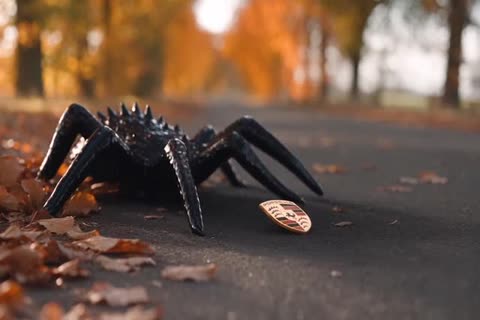
The creature has no reference image at all; it exists only as text, described as a wet, glossy black living liquid with spikes and long thin tendrils. The prompt then fixes an order of six named stages, CRAWL, CLAW, DOME, BURST, CHASSIS and DRAPE, so Seedance 2.5 Draft moves it from creeping through the leaves to gripping a crest, swelling into a dome, bursting, forming a bare chassis and finally draping into bodywork. In the output you can see it pull into a sphere, flatten on the asphalt, bubble back up and assemble machinery before the finished car appears. The clip was generated at 480p in 16:9, a draft setting suited to testing the motion before refining.
The canvas holds the three reference sheets, the video node with its tagged prompt, and a 30-second instrumental dark phonk track at 120 BPM that builds tension for its first 10 seconds before a heavy bass hit drops. To remake it, regenerate the vehicle sheet with your own car or product, then swap the character and location sheets. Update the named details in the video prompt so they match your new references, and keep the staged transformation so the reveal still has a clear build. Finally, trim the shots on the timeline and export to mp4 or FCPXML.